• Extensions
    • YJ Newsflash 5.0
    • Yj Newsflash Ultimate
  • Features
    • User Pages
      • Login Form
      • User Profile
      • User Regisrtation
      • Username Reminder
      • Password reset
      • 404 page
    • Menu Types
      • YJ Mega CSS Dropdown
      • YJ Mega Smooth Dropdown
      • YJ Mega CSS Dropline
      • YJ Mega Smooth Dropline
      • Joomla Split Menu
    • Template Styles
      • Bordo
      • Lime
      • Blue
      • Brown
      • Turquoise
    • Module Positions
    • Module styles
    • YJSG Mega Menu
  • Typography
  • Jstuff
    • Content Views
      • Category Blog View
      • Category List View
      • Categories View
      • Archived View
    • Web links
    • Contacts
    • Newsfeeds
  • Grids Preview
  • Shortcodes

Module Positions

Category: Template Settings Published: 28 July 2014
Written by Super User Hits: 89
  • Print
  • Email

YJSimpleGrid Framework comes with 51 build in module positions . Adding new module grids is a very simple process and within few seconds you can adjust the layout to your own liking. Each  module positon is completely collapsible either by disabling module in module manager or by setting module size to 0 in template manager. Mainbody grid is completely flexible and can swithc sides by simply adjusting default mainbody layout in template manager. Logo width and height can also be adjusted in template manager or completely disabled.
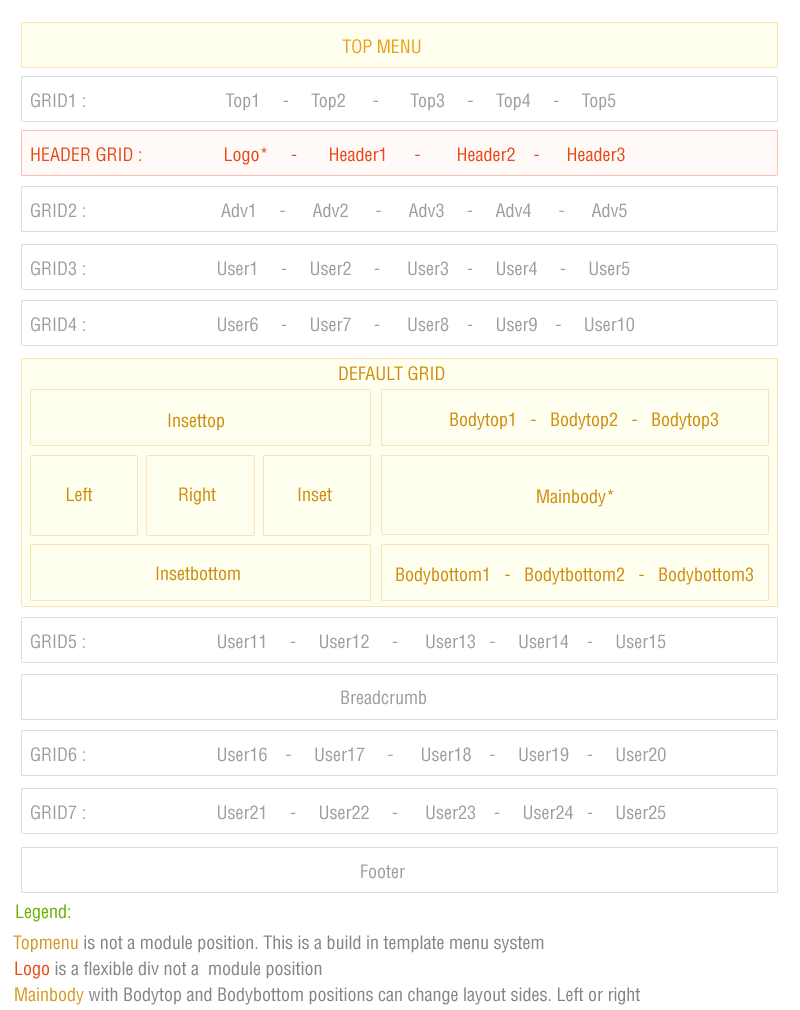
yjsg_modulepoz

  • Next
  • Home
  • Features
  • Module Positions
CSS Valid | XHTML Valid | Top | + | - | reset | RTL | LTR
Copyright © Youbistro 2026 All rights reserved. Custom Design by Youjoomla.com
YJSimpleGrid Joomla! Templates Framework official website
Module Positions